
How to Run Java Program?

Java is one of the most popular programming languages widely used for developing the various applications from mobile apps to large-scale enterprise systems. Running a Java program involves several steps from writing the code to executing it. This article will walk through each Java program step ensuring we can efficiently write, compile & run the Java applications.
Step 1: Install Java Development Kit (JDK)
To run Java programs we need to have the JDK installed on the machine. Follow these steps to install the JDK:
1. Download the JDK: Visit the official Oracle JDK download page or OpenJDK page and download the appropriate version for the operating system.
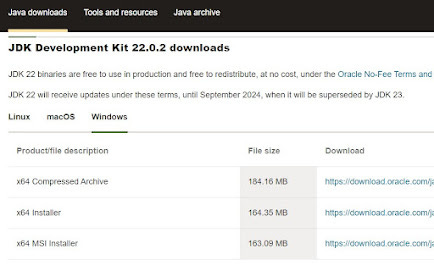
2. Install the JDK: Follow the installation instructions provided on the download page.
3. Set up Environment Variables: After installing the JDK set up the JAVA_HOME & PATH environment variables.
Windows:
Open System Properties and go to Advanced system settings.
Click on Environment Variables.
Add a new system variable
JAVA_HOMEand set its value to the JDK installation path.Edit the
Pathvariable and add%JAVA_HOME%\bin.
Mac/Linux:
Open the terminal and edit the
.bash_profileor.bashrcfile.Add the following lines: export JAVA_HOME=/path/to/jdk , export PATH=$JAVA_HOME/bin:$PATH
Save the file and run
source ~/.bash_profileorsource ~/.bashrc.
Step 2: Write Your Java Program
Create a new file with a .java extension and write Java code. Here’s a simple example:
public class a
{
public static void main(String[] args)
{
System.out.println(”Hello, World!”);
} }
Save this file as a.java.
Step 3: Compile Your Java Program
To compile your Java program open a terminal or command prompt and navigate to the directory where your HelloWorld.java file is saved. Run the following command:
javac a.java
This command will compile your Java program. If there are no errors it will generate a HelloWorld.class file in the same directory.
Step 4: Run Your Java Program
After compiling the program we can run it using the java command. In the same terminal or command prompt run:
java a
This command will execute the Java program and we should see the output:
Hello, World!
Conclusion
Running a Java program involves installing the JDK writing the code compiling it using the javac command & executing it using the java command. The Java’s platform independence and powerful features make it one of the most widely used programming languages in the world. By understanding the complete execution process beginners can easily start building Java applications efficiently.
Frequently Asked Questions (FAQs)
1. What is the difference between JDK, JRE, and JVM?
JDK: Development kit for writing Java programs
JRE: Environment for running Java programs
JVM: Executes Java bytecode
2. Why do we compile Java programs?
Compilation converts Java source code into bytecode that JVM can execute.
3. Can Java run without JDK?
Yes, programs can run with JRE but development requires JDK.
4. What is bytecode in Java?
The Bytecode is platform-independent code generated after compilation.
5. Which command is used to compile Java programs?